
Most enterprise IT teams have DKIM configured correctly. SPF records are clean. DMARC is enforced. The authentication stack is solid, until it isn't, and the failure source turns out to be something nobody put on the threat model: the email signature.
This isn't a fringe scenario. It's a predictable consequence of how most organizations manage signatures, which is to say they don't. Here's what's actually happening under the hood.
The Governance Gap
Ask any IT team who owns email signatures, and you'll get some version of the same answer: IT wants Marketing to own them, Marketing thinks IT controls them, and employees do whatever they want. The result is a distributed collection of unaudited, self-built footers going out on every outbound message the organization sends. No version control, no approval chain, no visibility.
Call it Signature Shadow IT. The risk isn't just that signatures look inconsistent. It's that your organization has no audit trail for content that touches every external communication you send, and no detection mechanism until something breaks.
Two categories of things break. One is obvious once you see it. The other is architectural.

The Deliverability Problem
Employee-built signatures hurt deliverability in ways that are genuinely difficult to trace back to the source.
The image-to-text ratio problem is the most common. Spam filters evaluate the proportion of image content relative to text as an abuse signal. Large images relative to message body is a documented spammer tactic. A signature with a high-resolution headshot and an oversized logo can tip an otherwise clean message into spam classification without any other trigger. The sender never knows. The recipient never sees it.
The HTML problem is less visible but more widespread. When someone builds a signature by copying from Word or a web editor, they import proprietary XML markup and non-standard CSS into the email's underlying HTML. That payload increases message size, degrades rendering consistency across clients, and produces formatting artifacts that are nearly impossible to reproduce remotely. The div-vs-table rendering split between modern clients and classic Outlook makes this worse. A signature that looks correct in Gmail can break entirely in classic Outlook, which has historically relied on a Word-based rendering engine that expects table-based HTML structures to display correctly.
Image hosting compounds both. Employees link signature assets to personal cloud drives, SharePoint folders, or marketing CMS platforms that weren't built for the load that comes with thousands of outbound emails daily. Those servers throttle. They return broken image icons to recipients. And spam filters score the reputation and response time of asset-hosting domains, not just the sending domain. A signature image hosted on a slow or flagged server affects sender reputation on messages that are otherwise completely clean.
The Architectural Problem: What Legacy Solutions Actually Do to Your Mail Flow
When organizations recognize the signature consistency problem and reach for a legacy signature management platform, many trade a governance problem for a security problem without realizing it until the implementation is already in.
The predominant architecture among legacy providers works like this: to stamp a uniform signature onto outgoing mail, they require you to reroute all outbound messages, internal and external, through their servers before delivery. The vendor intercepts the message, injects the signature, and forwards it on. It is, by definition, a man-in-the-middle. All outbound message content transits external infrastructure the organization doesn't control, and the security posture of that vendor becomes directly relevant to your own risk profile.

Most InfoSec policies have language that would prohibit exactly this configuration. It usually gets waved through on the assumption that email signature tools are low-risk. They aren't.
Why This Breaks DKIM and What the Workarounds Actually Cost You
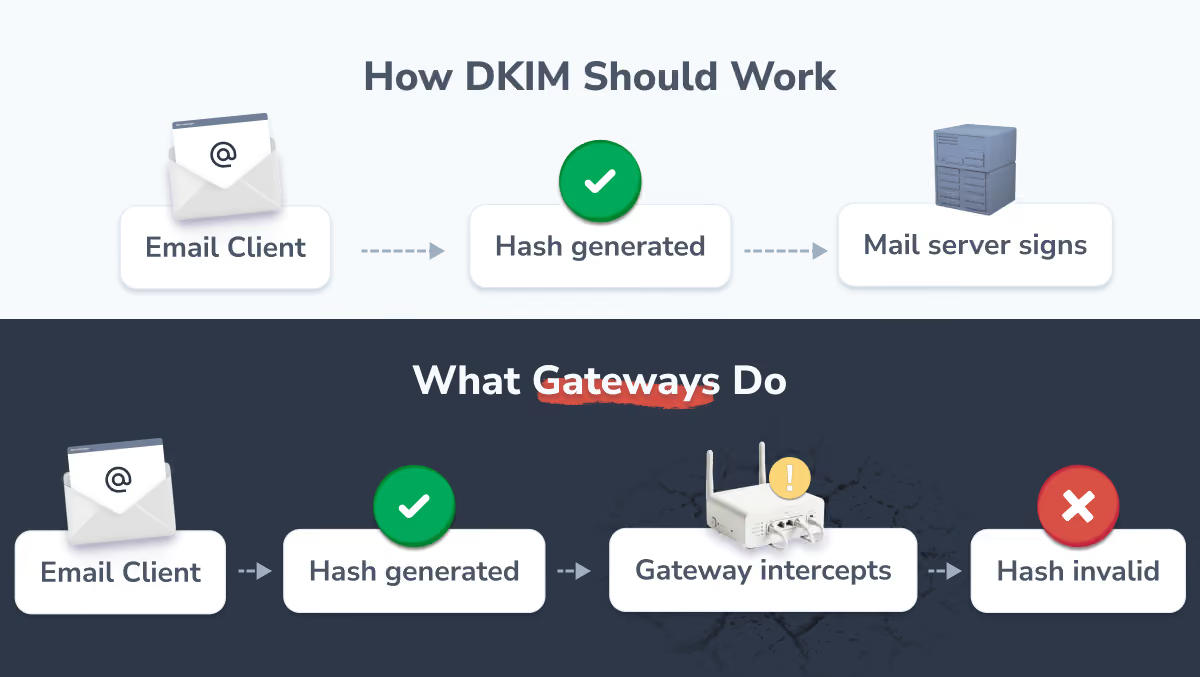
DKIM generates a cryptographic hash of the email body at send time. The hash travels with the message. The receiving server recalculates it on arrival. If the body changed in transit, the hashes don't match and DKIM fails. That's the mechanism working as designed.
Gateway-based signature tools break it structurally: they modify the body after it leaves the client but before it reaches your mail server for signing. The body that gets hashed is different from the body that was sent. DKIM fails.
Legacy providers solve this two ways, and neither is clean.
Key sharing. You hand the vendor your private DKIM signing key so they can re-sign after injection. The threat model here is straightforward: a compromised vendor credential allows that party to send authenticated mail as your organization. This requires a level of trust in vendor security controls that most teams don't actually verify before agreeing to it.
Round-trip routing. Mail routes to the vendor for signature injection, back into your tenant for native signing, then out to the recipient. Every additional hop is a failure point. A misconfigured routing rule or a vendor infrastructure outage doesn't just slow down delivery. It can produce a mail loop that takes your entire outbound flow offline. This is a known failure mode. It happens.
When DKIM fails at scale, DMARC enforcement at recipient servers starts quarantining or rejecting legitimate organizational mail. The sender has no visibility into this until the pipeline impact becomes apparent, usually when someone notices that emails to a specific domain aren't getting responses.
The Visibility Problem
Gateway architecture has a second-order failure mode worth naming separately. Because the signature gets injected after the message leaves the client, the sender never sees it during composition. The body they're looking at when they hit send is different from the body the recipient receives.
The predictable result is double signatures. Senders add their own — because they have no view into what the gateway will append — and recipients get two stacked on top of each other. It's the most common visible artifact of gateway deployment, and it isn't a configuration error. It's the architecture working as designed.
What the Architecture Should Look Like
The fix is conceptually straightforward, even if it's not how most of this product category was built.
Signature deployment should happen at the client level, before send, not in the mail path after the message leaves the client. The complete final message, signature included, gets hashed and signed by your own mail server on the first pass. No external servers in the message path. No key sharing. No routing workarounds. Your authentication stack doesn't need to know a signature tool exists.
Directory integration handles provisioning: signatures deploy and update based on attributes in Microsoft Entra ID or Google Workspace, so employee offboarding and role changes are reflected automatically rather than manually.
The operational side effect of centralizing this correctly is that Marketing gets full autonomy over signature content and campaigns without opening IT tickets, and IT gets out of the signature support business entirely. That's not the point of solving it, but it's a reasonable return on what is ultimately a one-time architectural decision.
HiHello is built on this architecture. We use secure APIs to deploy signatures directly to the user's Gmail or Outlook client before the email is sent. Your mail never touches an external server. SOC 2 Type II certified and GDPR-ready, the compliance conversation with your security team is a checkbox rather than a negotiation. And once the integration is configured, Marketing gains full autonomy over signature content and campaigns without opening a single IT ticket. You set it up once. Then it's genuinely not your problem anymore.
What to Ask Any Vendor
Before signing with a signature management provider, these questions will surface the architectural issues quickly:
- Does your solution require outbound mail to route through your servers at any point?
- Does your solution require access to our private DKIM signing keys?
- How does your solution preserve DKIM authentication integrity end-to-end?
- What is your SOC 2 audit scope?
- What is your incident response SLA for mail flow disruptions?
If the answers to the first two are yes, you're looking at the gateway architecture and the tradeoffs that come with it.
Email signatures are low on the threat model because they've always been someone else's problem. The governance gap that makes them a security risk is also the reason they stay unexamined. The underlying issues aren't complicated once you know where to look. The architecture that solves it exists. The question is whether your current signature tool is built on it.
Frequently Asked Questions
What causes email signatures to trigger spam filters?
Usually, it's a combination of factors hitting at once: bloated HTML from copy-pasting out of Microsoft Word, an image-to-text ratio that looks suspicious to filters, URL shorteners, and signature images hosted on slow or blacklisted servers. Spam filters don't evaluate your email in isolation. They're looking at the full picture, and a poorly built signature can tip the balance on an otherwise clean message.
Why do email signatures break DKIM and DMARC compliance?
It comes down to how legacy gateway tools work. DKIM generates a cryptographic hash of your email body at send time. If anything modifies that body after the hash is created, the signature fails. Legacy gateways intercept your email in transit, inject the signature, and forward it on. The body has changed, the hash no longer matches, and strict recipient servers will quarantine or reject the message. It's not a configuration problem. It's a fundamental architectural one.
How does email signature automation introduce security risks?
The risk comes from where the automation lives. Legacy tools that operate as mail gateways require your outbound mail to leave your secure tenant, pass through an external server to get the signature applied, and then continue to the recipient. Some also require you to hand over private DKIM keys so the vendor can re-sign on your behalf. Either way, you're introducing third-party infrastructure into a mail flow that should never leave your environment.
What makes HiHello different from other email signature management tools?
Most legacy tools sit in your mail path as a gateway, which creates all of the routing, authentication, and security problems described above. HiHello uses a client-side architecture instead. The signature is deployed directly to the user's Gmail or Outlook client before the email is sent, so the complete final message is signed and encrypted by your own mail server with no external servers involved. Your mail flow stays exactly as your security team configured it.
What should I ask an email signature vendor before buying?
Ask whether their solution requires outbound mail to route through their servers, whether they need access to your private DKIM signing keys, and how they preserve DKIM authentication integrity end-to-end. Also ask for their SOC 2 audit scope and their incident response SLA for mail flow disruptions. If the answer to either of the first two questions is yes, you are looking at a gateway architecture and should understand the security and deliverability tradeoffs that come with it.