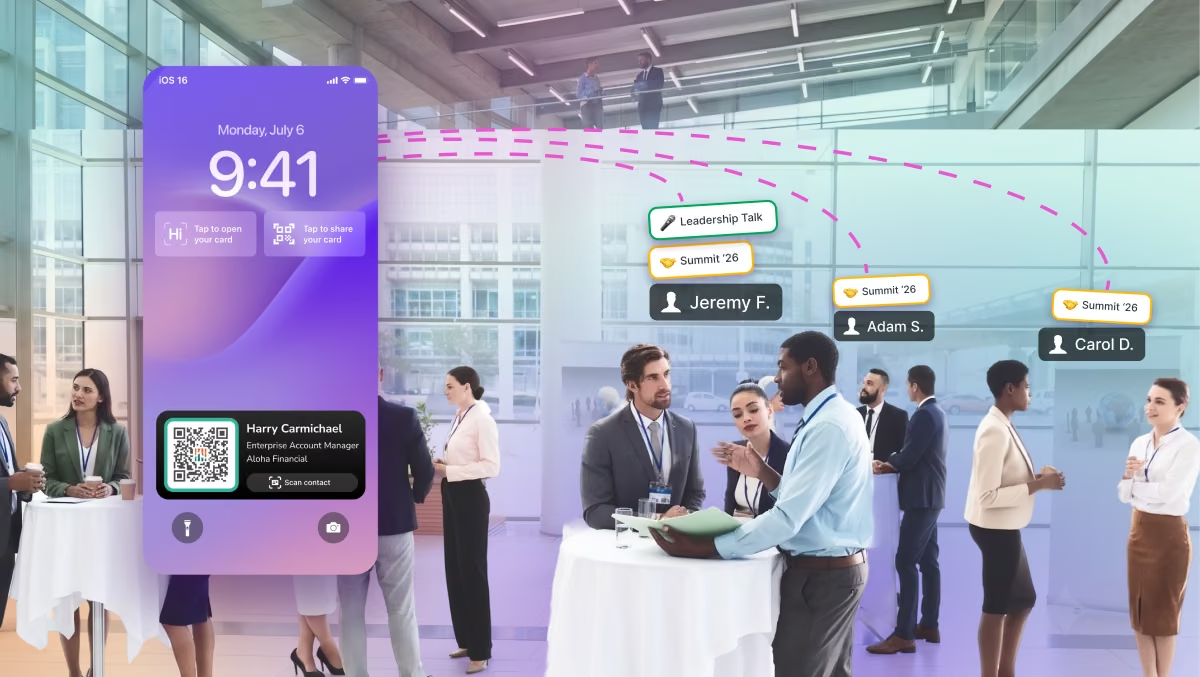
You'd think a feature called Events would house everything event-related in HiHello. Spoiler alert: it doesn't. In hindsight, we could've done a better job naming and explaining it.
What Events actually does is auto-tag every contact your reps collect during a set time window, offer custom lead capture, and track how the event performed, from leads to card shares to your most active reps. Useful, but it's maybe 10% of what using HiHello at an event looks like. On-brand cards for your whole team, badge scanning, CRM sync, signature banners that promote your booth: none of it lives under "Events," and most of it doesn't need one.
So here's the explanation we owe you: everything HiHello Lead Capture does before, during, and after an event, and which parts actually need Events.
It's worth getting right. Cvent's 2025 research found 79% of companies say events matter more than any other channel, yet nearly two-thirds can't attribute ROI to them. Most of that gap is what happens between the conversation and the CRM: 80% of leads never reach the CRM at all.
1. Create an event (the part we named "Events")
The Events feature is simple: a named time window plus the reps who represent your team there. It can be a trade show, a conference, a customer dinner, a field event, a webinar, or a career fair.
It doesn't even have to be an event. Because Events is really a tagged time window, you can use it for pure auto-tagging: a sales blitz, a campaign week, or a regional roadshow, so every contact from that stretch is grouped and reportable.
Creating one takes a name, a place, a start and end time, and the reps you add. From then on, every contact those reps collect during the event's time window is tagged to the event automatically. That one step unlocks:
- Automatic tagging, so nobody sorts contacts by hand after the show
- A live event dashboard for captures and card shares as they happen
- Event reports and export for the post-event review
- Comparisons across events, teams, and regions
2. Get every card ready
Put everyone's card on brand. Your card template keeps every card consistent and controls which fields employees can edit. Before an event, give it a quick check: Is the logo current? Do the links point where you want event traffic to go? A change to the template updates every card that uses it. That includes people who aren't attending, because reps can share any colleague's card from the Company Directory.
Make cards fast to reach. Reps can add a home screen widget, pin their card's QR code to the lock screen with an iOS Live Activity, save their card to Apple or Google Wallet, or share with a tap over NFC. And if the venue Wi-Fi gives out, offline mode in the app keeps their card shareable with no signal.
Decide what you need to know about each lead. A name and email might be enough for a customer dinner. A trade show might call for company size, timeline, or which product someone stopped by for. If this event's needs are different from usual, set up a lead capture form for the event with the fields that matter. Keep in mind that Contact Enrichment can help fill in the gaps, so the form can stay short.
Bonus: cards don't have to be people. Create a card for the event, your company, or a product you're launching. Share it at the booth to send people straight to a demo sign-up, a product page, or your session.
3. Promote your presence beyond the booth
Most people who should hear about your event never walk past your booth, but they're in your team's inbox. Schedule Email Banner Campaigns to put your booth number or demo link in every email your company sends before the show, then automatically switch to a follow-up offer afterward. For webinars and virtual events, branded Virtual Backgrounds keep every presenter on brand.
4. Capture every lead at the event
HiHello gives reps a way to capture a lead however the conversation goes.
- Lead capture forms. Share your card any way you want and let the embedded lead capture experience collect the leads and lead information for you. You can customize the lead capture experience and even add event-specific questions.
- Scan their card or badge. The Universal Contact Scanner turns paper cards, event badges, and even scribbles into contacts. Optional Contact Enrichment fills in missing details, so reps have context when they follow up.
- Route leads to the right person. Pull up any colleague's card from the Company Directory, so a prospect who needs a solutions engineer leaves with the right contact.
- Add notes. Since tags are already automatically taken care of, reps can focus on adding notes about the conversation while it's fresh. Those notes go right into your CRM, so the context is never lost and follow-ups stay personalized.
- Type it in. Manual entry covers everything else.
5. Sync leads to your CRM as they're captured
HiHello syncs each contact to Salesforce, HubSpot, or Microsoft Dynamics as it's captured, tagged to the event, and with the rep's notes attached. Nobody exports a spreadsheet after the show. And more importantly no one has to spend hours cleaning up post-event contact lists. Individual users can also sync to Google Contacts, Outlook, or any integration through Zapier.
Because event leads land in the system your team already uses, your CRM's own tasks, sequences, and reminders pick them up like any other lead. That matters: Harvard Business Review found that companies reaching out within an hour were nearly seven times more likely to qualify a lead than companies that waited even an hour longer.
6. Measure what the event drove
During the event, the live dashboard shows captures and card shares as they happen. Afterward, the event report shows captures, card shares, your most active reps, and you can export it.
This means that everything you need to understand event ROI is now right at your fingertips. Admins can compare events, teams, and regions in one place, and HiHello's analytics show card views, shares, and contacts collected across your whole team. For more on tying events to pipeline, see how HiHello helps you prove event ROI.
What works anytime, and what needs an event
Works anytime, no event needed:
- On-brand cards for everyone, managed by marketing, plus the Company Directory
- Event, company, and product cards
- Sharing by QR code, NFC, link, text, or email, from the app, a widget, an iOS Live Activity, or Wallet
- Offline sharing (one-way)
- Universal Contact Scanner
- Contact Enrichment
- Contact tags and notes
- Real-time CRM sync
- Scheduled Email Banner Campaigns and Virtual Backgrounds
Needs an event:
- Auto-tagging of every contact the event's reps collect during its time window
- Event-specific lead capture forms
- Event dashboard
- Event reports and export
Now you know the other 90%
Before your next event, create it in HiHello, check your card template, and decide what you want to learn from each lead. Tagging and CRM sync take care of themselves from there. For a real example, see how attendees used HiHello at TechCrunch Disrupt 2025.
HiHello is ranked #1 in Event Lead Capture on G2 for Implementation and Results (Fall 2026).
Already on HiHello? Create your next event, and find setup details in the Help Center. New to HiHello? See Lead Capture in action or try HiHello for free.
Frequently Asked Questions
Do I have to create an event to capture leads?
No. Card sharing, scanning, notes, and CRM sync work anytime. Create an event when you want every contact tagged to it automatically and a report on what the event drove.
What gets tagged to an event?
Every contact the reps you added collect during the event's time window.
Can I use Events if I'm not attending an event?
Yes. You can set up an event in HiHello purely for auto-tagging, such as a sales blitz or campaign week, and every contact your reps collect in that window is grouped together.
What kinds of events does HiHello Lead Capture work for?
Anything with a time and place where your team meets people: trade shows, conferences, customer dinners, field events, career fairs, meetups, and webinars.
How do I measure event ROI with HiHello?
Create the event so every contact is tagged to it. Then use the event report for captures and activity, your CRM for the pipeline those contacts become, and your event costs to calculate the return.
Which CRMs does HiHello sync with?
Teams sync to Salesforce, HubSpot, and Microsoft Dynamics. Individual users can also sync to Google Contacts, Outlook, or Zapier. Contacts sync as they're captured, not after the event.
What if there's no internet at the venue?
Offline mode lets reps keep sharing their cards, and the other person only needs their phone to save one. Sharing offline is one-way, so scan their card or badge to capture their details.
Which HiHello plans include these features?
Anyone can share a HiHello card, including on the free Personal plan. Auto-tagging is included on every paid plan. Business and Enterprise add team management, the Company Directory, and more robust event reporting and analytics. On Enterprise, events are part of the Lead Capture add-on.